Adding Textures
This is where you can start off with texturing your model! You can use a paid program like Substance Painter or a free program like Krita. The only difference is the features of what you can and can't do. Substance Painter is highly used for giving a realistic look but Krita has nothing like that as it's not meant to be used for making 3d materials. Krita can still somewhat achieve the realistic look but not much as your option would be Substance Painter if you want to have a 3d look. But, Krita is still favored as some people like non-realistic stuff. It only depends on what style you're going for at the end of the day.
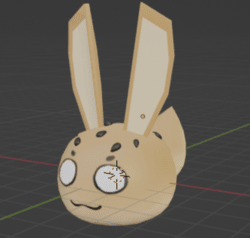
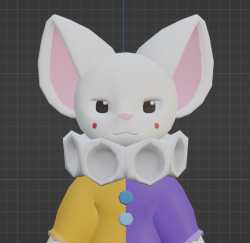
For texturing, you first need to unwrap your model. A clean uv unwrap can be used to make different variations of your model as you can use multiple textures with different colors on it to have a new look! Messy uv's will overlap the model's texture if for example: you have a body and some clothing texture next to each other resulting in a strange display on the model. It wouldn't look right if you have a messy one unless you know what you're doing. Uv stacking is ok by having the same color if it's a 'seamless' texture. Blender also has a way to texture your models in a 3d space but in my preference, I don't use it and wouldn't be sure how to explain how to use it, but the video I provide will show you how to use it better than how I can explain it.
Once you unwrap and clean up the uv, make a krita or any file of your program choice and use the uv as a guide to color your model.
Next, You can add shading to make the character less flat-colored. For my models, I don't usually shade as it's a style choice as you can see in the images that are being shown.
From here, you can optionally add 'fur', 'skin', or 'cloth' textures for a more detailed look by using an online greyscale as a mask. They must be over the color layer otherwise, the mask will be hiding under the color layer. If the texture you find such as 'skin' is not greyscale, you can greyscale it online or use it as it is. Finally, you want to lower your opacity to make it less visible as you want to see your color layer.
Congrates! your done with texturing your character! Next is to rig the model so you can pose it for photos. Give yourself an applause first to celebrate.